Install HotPlayeron your iPhone / iPad
- DeviceiPhone / iPad
- AppHotPlayer
- 3SetupFollow the steps
%20scale(0.100000,-0.100000)'%20fill='%23f59e0b'%20stroke='none'%3e%3cpath%20d='M2507%205029%20c-28%20-16%20-44%20-60%20-46%20-127%20-1%20-34%20-4%20-73%20-6%20-85%20-2%20-12%20-6%20-49%20-10%20-82%20-9%20-96%20-34%20-224%20-69%20-365%20-27%20-103%20-73%20-247%20-106%20-325%20-92%20-218%20-171%20-371%20-263%20-512%20l-60%20-91%20-56%2071%20c-72%2090%20-160%20171%20-276%20252%20-101%2071%20-132%2083%20-174%2065%20-37%20-15%20-43%20-29%20-86%20-193%20-41%20-160%20-94%20-311%20-210%20-597%20-166%20-410%20-227%20-603%20-270%20-855%20-26%20-160%20-28%20-524%20-2%20-664%2055%20-295%20178%20-568%20360%20-796%2061%20-77%20227%20-236%20309%20-297%20213%20-161%20454%20-267%20719%20-319%20140%20-27%20385%20-33%20534%20-13%20649%2086%201203%20557%201408%201199%2020%2061%2041%20137%2048%20170%207%2033%2014%2067%2016%2075%2029%20140%2025%20546%20-7%20772%20-6%2040%20-13%2089%20-15%20108%20-3%2019%20-7%2046%20-10%2060%20-3%2014%20-10%2052%20-16%2085%20-15%2082%20-35%20122%20-68%20133%20-48%2017%20-77%203%20-133%20-61%20-84%20-97%20-186%20-193%20-284%20-268%20-49%20-38%20-94%20-69%20-98%20-69%20-5%200%20-6%2018%20-2%2039%2025%20158%2026%20587%201%20781%20-33%20255%20-105%20555%20-175%20725%20-7%2017%20-19%2046%20-27%2065%20-165%20398%20-422%20759%20-742%201040%20-104%2091%20-138%20106%20-184%2079z'/%3e%3c/g%3e%3c/svg%3e)
- 1
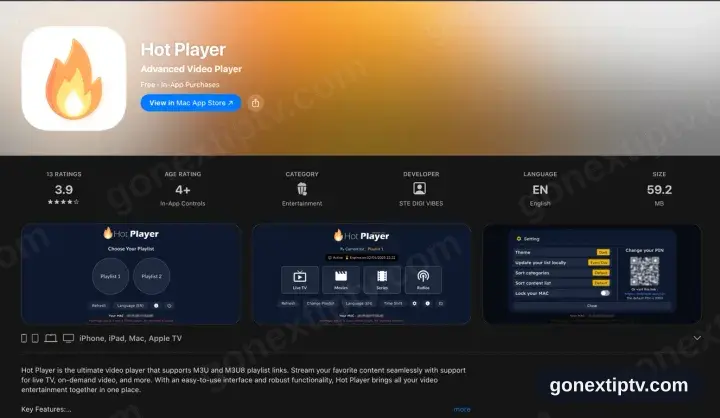
Look up Hot Player in the App Store
On the iPhone or iPad open the App Store, tap Search and type Hot Player. Free to download with a trial included; the playlist licence is an in-app purchase that also covers Apple TV and Mac.
- 2
Install, then launch Hot Player
Tap Get, let it finish, then start the app.
- 3
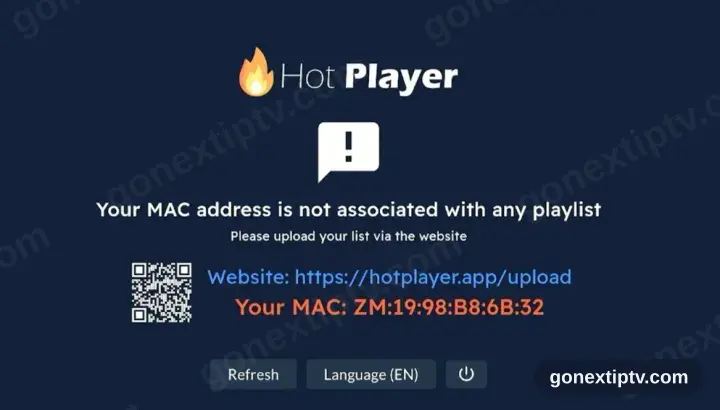
HotPlayer wants a playlist
First run shows no playlist plus a device ID and the address hotplayer.app/upload. Park that screen — you come back to it.
- 4
Attach the playlist at hotplayer.app/upload
From any browser, load hotplayer.app/upload. Pick Xtream Code as the source, drop in the server URL, username and password from your account on our website, then save.
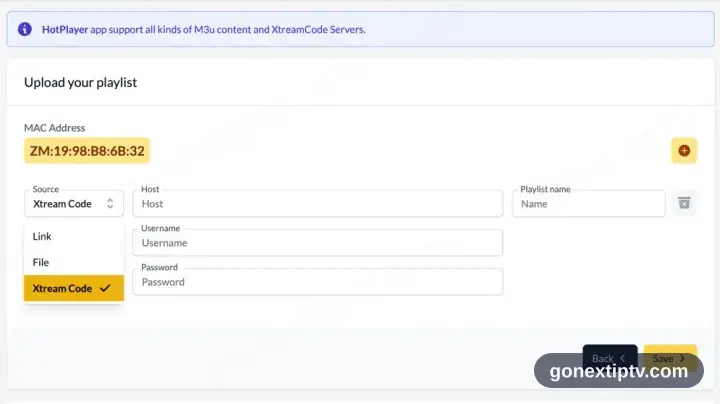
Safari on the very same iPhone or iPad will do — the upload page is a website, not part of the app.
- 5
Tap Refresh in the app
Head back to Hot Player and tap Refresh. It reads the playlist you just attached.
- 6
You are live
Channels, films and series populate. Hit play on anything to confirm the feed.
Your GO Next IPTV login details (username, password & server URL, M3U link or MAG portal URL) are in your account on our website as soon as your subscription is active. Can't find them? Contact support and we'll help.
Installing HotPlayer on iPhone / iPad: what is different
On iPhone and iPad, HotPlayer installs from the iOS App Store — the same Apple ID you already use, no extra account.
iOS players are often a one-off paid download rather than a subscription. That charge is Apple's, separate from your iPhone / iPad playback.
Turn off Low Power Mode before a long match: iOS throttles background networking, which shows up as buffering mid-stream.